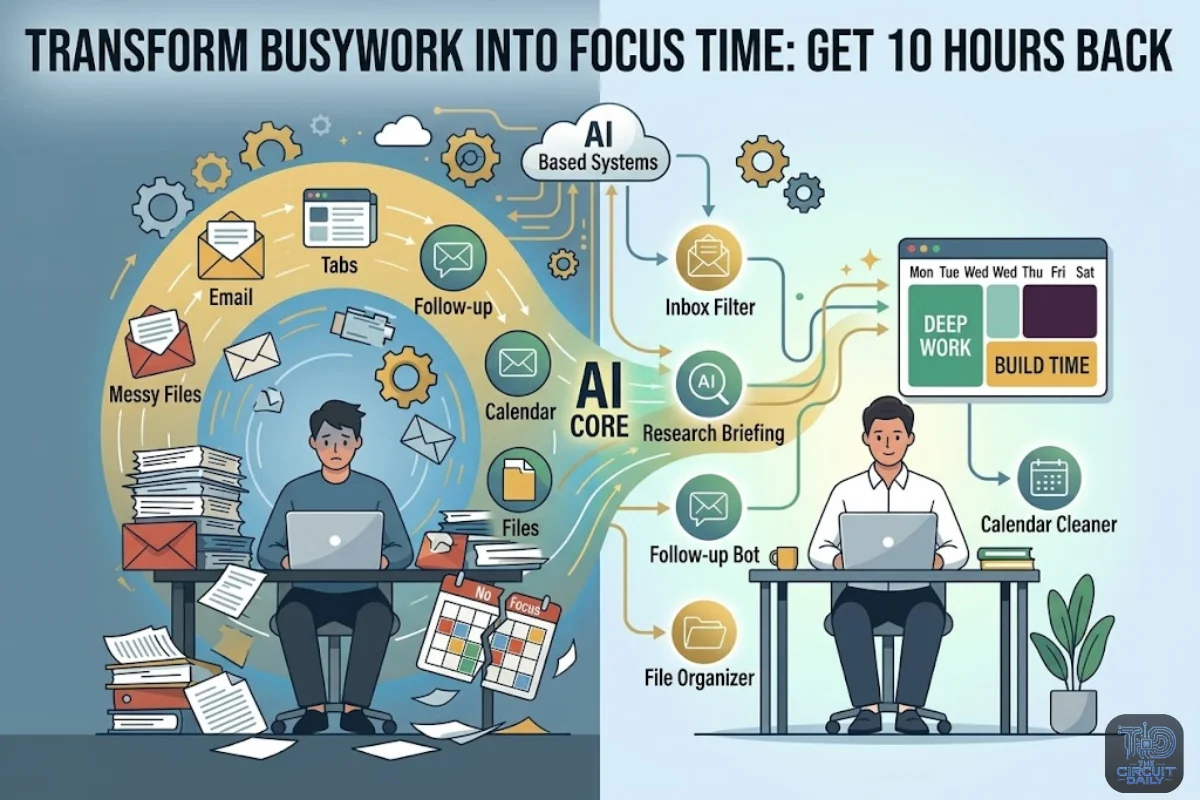
Most people are not losing time because they are lazy.
They are losing time because their day is full of small things that slow them down.
Sorting emails. Taking meeting notes. Opening research tabs. Sending follow ups. Planning content. Cleaning up files. Making tiny choices all day. These things drain your mind before the real work even starts.
That is the real problem. The modern workday often makes people act like machines.
Click. Copy. Paste. Reply. Search. Sum up. Do it again.
That way of working is starting to fall apart.
The good news is simple. AI automation is not just for engineers or big tech teams anymore. The best tools now work quietly in the background. They handle the small jobs that used to steal your focus.
This is not about replacing your thinking.
It is about protecting it.
Here are the AI automations that can help turn a messy week into a calmer and smarter one.
1. The Inbox Filter That Stops Email From Taking Over Your Morning.
Your inbox is not just a place for messages anymore.
It feels more like a fight.
AI email tools can sort messages by importance. They can spot urgent replies. They can sum up long threads. They can even draft answers before you open the email.
Why this matters.
Email can eat up a lot of your time. Every message feels important when it first lands in your inbox. AI helps you cut through that. It turns your inbox into a clean simple list of what really needs your attention. No more messy pile of digital noise.
Pro tip.
Make three AI helped labels. Reply Today. Read Later. No Action Needed. The goal is not inbox zero. The goal is fewer choices.
2. The Meeting Note Bot That Turns Talk Into Action.
Meetings create two jobs.
First there is the meeting.
Then there is the annoying job of remembering what everyone agreed on.
AI meeting tools can write down calls. They can sum up key points. They can pull out tasks. They can send follow up notes on their own.
Why this matters.
The real value of a meeting is not the talking. It is what people do after. AI helps make sure decisions do not get lost in messy notes.
Pro tip.
Ask your AI meeting tool to split notes into three parts. Decisions Made. Tasks Assigned. Open Questions. This keeps people on track without needing another meeting.
3. The Research Assistant That Reads The Internet Before You Do.
Research used to mean opening 17 tabs and pretending you would read them all.
Now AI can scan articles. Reports. Videos. PDFs. Search results. Then it can turn all of that into one clean briefing.
Why this matters.
The internet has too much information. The real edge comes from knowing what it all means. AI helps you move faster from what happened to why it matters.
Pro tip.
Use this prompt.
Sum up the main points. The hidden risks. And what most people are missing.
That last part is often where the best insight shows up.
4. The Content Repurposer That Turns One Idea Into Ten Assets.
One good idea should not be trapped in one format.
AI can turn a blog post into Pinterest pins. LinkedIn posts. Email snippets. Short video scripts. Carousel captions. Newsletter blurbs.
Why this matters.
Content growth is not only about posting more. It is about getting more value from each strong idea. AI makes sharing your work feel less like another full time job.
Pro tip.
Build a simple content path for every article.
Blog post. Pinterest pin. Facebook caption. Email teaser. Short video script.
One idea can create many traffic paths.
5. The Calendar Cleaner That Protects Your Deep Work.
Your calendar may look neat.
But if it is packed with random calls. Small tasks. And no focus time. It is quietly hurting your best work.
AI calendar tools can suggest better meeting times. They can group calls together. They can protect focus blocks. They can also warn you when your schedule is getting too full.
Why this matters.
Time management is not just about having enough hours. It is about having the right kind of hours. One long focus block can be worth more than a whole day full of broken little gaps.
Pro tip.
Set one protected block called Build Time. No calls. No admin. No inbox. This is where the real work gets done.
6. The Customer Reply Engine That Handles The Same Questions Again And Again.
If you answer the same questions every week. You do not have a message problem.
You have a chance to automate.
AI support tools can answer common questions. They can send harder issues to the right person. They can draft replies. They can also help keep the same tone across messages.
Why this matters.
Fast responses build trust. But typing out the same answers again and again takes up a lot of time. AI helps small teams work smarter and faster while still keeping that real human connection that matters most.
Here is a useful tip.
Start with the twenty questions people ask you the most. Turn those into a ready AI reply bank first before you automate anything else.
7. The File Organizer That Finds What Your Brain Forgot.
Most digital workspaces turn into a mess because people name files poorly when they are in a hurry.
AI can fix that. It labels documents for you. It sums up PDFs. It tags images. It sorts receipts. And it lets you find any file just by talking to it in plain everyday language.
Why this matters.
Search is becoming more like a conversation. You do not always need to remember file names. You can ask for the contract from last March with the pricing table. AI can help find it.
Pro tip.
Use simple tags. Finance. Client Work. Content. Legal. Ideas. AI works better when your system is easy to understand.
8. The Personal Briefing That Replaces Doomscrolling.
Instead of scrolling through news. Newsletters. Feeds. And alerts. AI can build a daily briefing around what you care about.
Think tech headlines. Competitor news. Market shifts. Saved articles. Big trends. All in one basic update.
Why this matters.
Genius people are not trying to read more. They are trying to sort better. AI can help you stay up to date without spending your whole day inside your feed.
Pro tip.
Ask for a briefing with four parts. What Changed. Why It Matters. Who Is Affected. What To Watch Next.
9. The Task Translator That Turns Ideas Into Action.
A messy idea in your head is not very useful until it becomes a next step.
AI can turn voice notes. Rough thoughts. Meeting notes. Or random messages into clean task lists. Project plans. Checklists. And deadlines.
Why this matters.
Most people do not fail because they have no ideas. They fail because the idea never becomes a system. AI helps close the gap between thinking and doing.
Pro tip.
When you save a rough idea. Ask AI this.
Turn this into a 5 step action plan. Make the first task take less than 10 minutes.
That removes the hardest part.
Summery
| Category | The AI’s Job | Your “Win” |
| 1. Inbox Filter | It sorts emails and drafts replies. | Fewer choices in the morning. |
| 2. Meeting Bot | It records meetings and sums them up. | No more wondering what everyone agreed on. |
| 3. Research Assistant | It turns 17 open tabs into one clear brief. | Less overload and more useful insight. |
| 4. Content Repurposer | 1 Idea $\rightarrow$ 10 Formats. | Massive reach with minimal effort. |
| 5. Calendar Cleaner | Groups meetings and shields focus blocks. | Protected “Deep Work” time. |
| 6. Reply Engine | Automates FAQs. | Fast trust without repetitive typing. |
| 7. File Organizer | Auto-tags and “talks” to your files. | No more hunting for “Draft_v2_final.” |
| 8. Personal Briefing | Curates specific industry news. | Ends the doomscroll. |
| 9. Task Translator | Turns voice notes into action plans. | Bridges the gap from idea to execution. |